
How to Create a Bandwidth Utilization Report
Bandwidth is the invisible highway your business travels on every day. Every video call, cloud backup, software update, file transfer, customer transaction, and employee login consumes part of that highway. A bandwidth utilization report helps you understand how much of your network capacity is being used, when it is being used, who or what is using it, and whether your current internet or internal network resources are enough to support your operations.
TLDR: A bandwidth utilization report shows how network capacity is consumed over time, helping you identify congestion, unusual traffic, and opportunities for optimization. To create one, define your reporting goals, collect traffic data from network devices or monitoring tools, analyze usage patterns, and present the findings clearly with charts and recommendations. A good report should not only show numbers, but also explain what they mean and what actions should be taken next.
Why Bandwidth Utilization Reports Matter
Many organizations only think about bandwidth when something goes wrong: video calls freeze, applications slow down, users complain, or cloud services become unreliable. By then, the network team is already under pressure. A bandwidth utilization report turns the conversation from reactive troubleshooting into proactive planning.
With a well-built report, you can answer questions such as:
- Are we paying for more bandwidth than we actually need?
- Are certain applications consuming too much capacity?
- Do we experience congestion at specific times of day?
- Is unusual traffic a sign of malware, data leakage, or misconfiguration?
- Should we upgrade our internet connection or optimize existing usage?
In short, the report becomes a practical decision-making tool for IT teams, managers, finance departments, and business leaders.
Step 1: Define the Purpose of the Report
Before collecting data, decide what the report is supposed to accomplish. A report for an IT engineer investigating packet loss will look different from a report for an executive deciding whether to approve a circuit upgrade.
Common goals include:
- Capacity planning: Determining whether existing bandwidth can support future growth.
- Performance troubleshooting: Identifying peak usage, congestion, and bottlenecks.
- Cost control: Finding underused links or unnecessary service upgrades.
- Security monitoring: Spotting abnormal traffic spikes or suspicious data transfers.
- Application analysis: Understanding how much bandwidth is used by specific systems, departments, or users.
Once the purpose is clear, you can decide which metrics matter most and how detailed the report should be.
Step 2: Identify the Network Scope
A useful bandwidth report needs clear boundaries. Are you reporting on the entire organization, a single office, a branch location, a data center, a cloud connection, or one critical link?
Define the scope by listing the devices and connections to be monitored. These might include:
- Routers and firewalls
- Switches and wireless controllers
- Internet circuits
- WAN or SD WAN links
- VPN tunnels
- Cloud gateways
- Critical application servers
Be specific. Instead of saying “monitor office bandwidth,” define the exact interface, such as the firewall’s WAN port or the router interface connected to the internet service provider. This prevents confusion later when comparing traffic values.
Step 3: Choose the Right Metrics
Bandwidth utilization is usually expressed as a percentage of total available capacity. For example, if a 1 Gbps link is carrying 700 Mbps of traffic, utilization is 70%. However, a strong report should include more than one number.
Important metrics include:
- Inbound traffic: Data entering the network, such as downloads, cloud application responses, and streaming content.
- Outbound traffic: Data leaving the network, such as uploads, backups, email attachments, and hosted services.
- Peak utilization: The highest usage recorded during the reporting period.
- Average utilization: Typical usage over time, useful for long-term planning.
- 95th percentile utilization: A common telecom metric that excludes brief spikes and shows sustained demand.
- Top talkers: Devices, users, or applications consuming the most bandwidth.
- Protocol or application breakdown: Traffic grouped by service, such as video conferencing, web browsing, backups, or file sharing.
- Error and discard rates: Helpful for understanding whether congestion is causing packet loss.
The best reports combine usage volume with business context. A spike caused by the finance team uploading month-end reports may be expected; a spike caused by an unknown device sending gigabytes of data outside business hours deserves investigation.
Step 4: Collect Bandwidth Data
There are several ways to gather utilization data, depending on your infrastructure and available tools. The most common method is using SNMP, which allows monitoring systems to query routers, switches, and firewalls for interface traffic counters. Another popular approach is flow monitoring, such as NetFlow, sFlow, IPFIX, or similar technologies, which provide deeper detail about traffic sources, destinations, ports, and applications.
Basic SNMP data can tell you how much traffic passed through an interface. Flow data can tell you who generated the traffic and what kind of traffic it was. If you only need a high-level link utilization report, SNMP may be enough. If you need user, device, or application details, flow data is usually more valuable.
You can collect data from:
- Network monitoring platforms
- Firewall reporting systems
- Router and switch logs
- Cloud network monitoring services
- ISP usage portals
- Packet capture tools for short-term investigations
Make sure the data collection interval matches your reporting needs. A five-minute polling interval is common for operational monitoring. For detailed troubleshooting, you may need shorter intervals. For monthly business reporting, longer aggregated intervals may be acceptable.
Step 5: Establish the Reporting Period
The time window you choose can dramatically affect the conclusions of the report. A one-hour snapshot may reveal a temporary problem, but it cannot prove a long-term capacity issue. A monthly report may show trends, but it might hide short bursts of congestion.
Consider using multiple reporting periods:
- Daily view: Useful for identifying hour-by-hour patterns.
- Weekly view: Good for comparing weekdays, weekends, and recurring events.
- Monthly view: Helpful for capacity planning and management reviews.
- Quarterly view: Best for strategic planning, budgeting, and growth analysis.
A good bandwidth utilization report often includes both a summary period and a drill-down section. For example, you might show monthly averages first, then highlight the three busiest days and the top causes of congestion.
Step 6: Analyze Usage Patterns
Once you have the data, look for patterns rather than isolated numbers. Network traffic almost always has a rhythm. Offices often peak in the morning when employees log in, again after lunch, and during scheduled backups or software updates. Remote teams may produce heavier VPN usage early in the day. Retail networks may peak during sales events. Schools may spike when students stream educational media or submit assignments online.
Ask questions such as:
- When does utilization consistently exceed 70%, 80%, or 90%?
- Are spikes brief, or do they last long enough to affect users?
- Is congestion inbound, outbound, or both?
- Which applications or devices are responsible for the heaviest usage?
- Do peak periods align with business activity or unexpected behavior?
As a general rule, sustained utilization above 80% on a critical link deserves attention. It may not mean you need an immediate upgrade, but it does mean the link has limited headroom. If usage regularly reaches 95% or more, users may already be experiencing slowdowns, timeouts, or poor application performance.
Step 7: Separate Normal Traffic from Unusual Traffic
Not all heavy bandwidth usage is bad. A scheduled backup, cloud migration, operating system update, or large design file transfer can be completely legitimate. The key is to distinguish expected usage from suspicious or wasteful usage.
Examples of traffic worth investigating include:
- Large outbound transfers to unknown external destinations
- High usage from a device that should be idle
- Streaming or file-sharing traffic during business-critical hours
- Unexpected spikes outside normal working times
- Repeated traffic to risky or unapproved services
This is where application-aware reporting becomes useful. If the report shows that 40% of bandwidth is being consumed by video conferencing during work hours, that may be acceptable. If it shows the same amount going to unauthorized streaming, the recommendation might be policy enforcement or traffic shaping rather than buying more bandwidth.
Step 8: Build Clear Visualizations
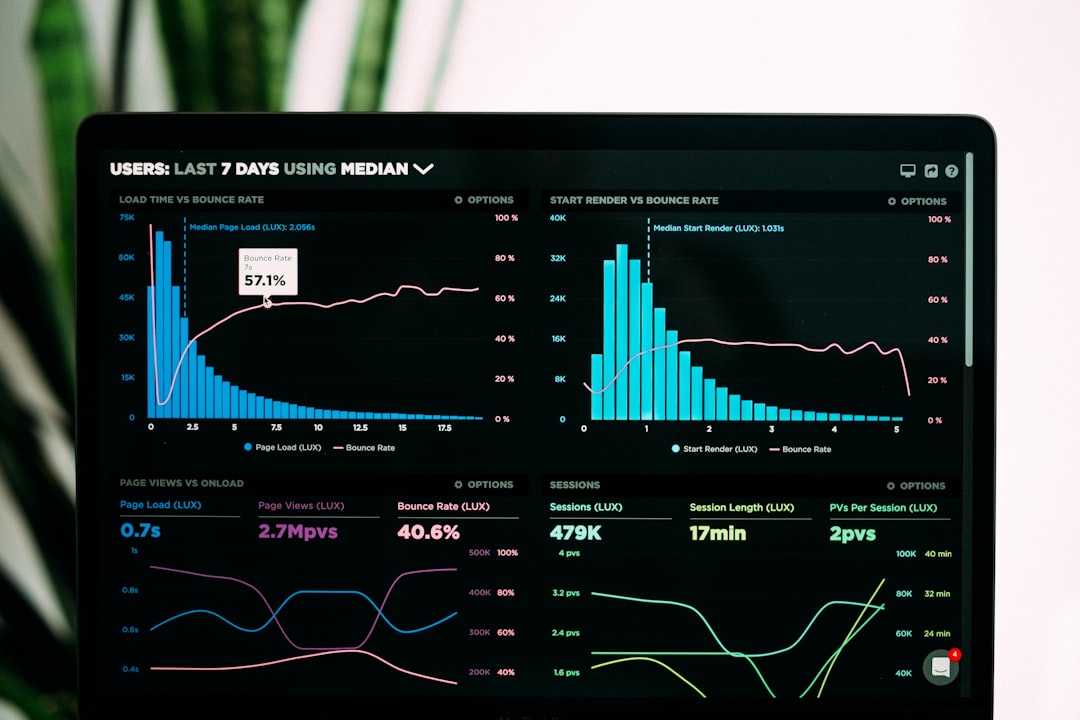
A bandwidth utilization report should be easy to understand at a glance. Raw tables have their place, but visualizations make the story clearer. Use charts to show trends, compare usage, and highlight problem areas.
Useful visuals include:
- Line charts: Best for showing bandwidth usage over time.
- Bar charts: Useful for comparing sites, departments, or applications.
- Pie charts: Helpful for high-level traffic category breakdowns, though they should not be overused.
- Heat maps: Excellent for showing busy hours across days of the week.
- Top ten tables: Good for listing top users, applications, or destinations.
Use consistent units throughout the report. Avoid mixing Mbps, Gbps, MB, and GB without explanation. Label axes clearly, include dates and times, and specify whether the values are averages, peaks, or percentiles.
Step 9: Add Interpretation and Business Context
The most valuable part of the report is not the chart itself; it is the explanation beneath it. A graph may show that bandwidth peaked at 92% on Tuesday at 10:00 a.m., but readers need to know why that matters.
For each major finding, include a short interpretation:
- Observation: “WAN utilization exceeded 90% on four business days.”
- Impact: “Users may experience slow access to cloud applications during these periods.”
- Likely cause: “Traffic was primarily generated by cloud backup jobs and video meetings.”
- Recommendation: “Reschedule backups to after-hours and review quality of service settings.”
This format transforms technical data into actionable insight. It also helps non-technical stakeholders understand whether the issue is urgent, financial, operational, or security-related.
Step 10: Make Practical Recommendations
A bandwidth utilization report should end with clear next steps. Avoid vague statements like “monitor the network closely.” Instead, recommend specific actions based on the evidence.
Possible recommendations include:
- Upgrade an internet circuit if sustained utilization is consistently high.
- Apply quality of service rules to prioritize voice, video, and business-critical applications.
- Move backups, updates, or large file transfers to off-peak hours.
- Block or limit non-business traffic that consumes excessive bandwidth.
- Investigate suspicious outbound data transfers.
- Redistribute traffic across multiple links.
- Review wireless network usage if congestion is local rather than internet-related.
Whenever possible, include estimated benefits. For example, “Moving backup jobs from 11:00 a.m. to 11:00 p.m. is expected to reduce peak business-hour usage by approximately 25%.” Estimates make the report more persuasive and easier to act on.
Suggested Report Structure
If you are creating a bandwidth utilization report from scratch, use a simple structure that readers can follow quickly:
- Executive summary: Main findings and recommendations.
- Scope: Devices, links, sites, and time period covered.
- Methodology: Data sources, polling intervals, and metrics used.
- Utilization overview: Average, peak, and percentile usage.
- Trend analysis: Daily, weekly, or monthly patterns.
- Top consumers: Users, devices, applications, or destinations.
- Issues and risks: Congestion, abnormal traffic, or capacity concerns.
- Recommendations: Practical actions, priorities, and expected outcomes.
- Appendix: Detailed charts, raw data, and technical notes.
Common Mistakes to Avoid
One common mistake is reporting only averages. A link with 35% average utilization may still suffer from severe congestion during short peak periods. Another mistake is ignoring outbound bandwidth, especially for organizations that rely on cloud backups, file sharing, hosted services, or remote workers.
It is also risky to assume that more bandwidth is always the answer. Sometimes the real solution is better scheduling, improved traffic prioritization, removing unnecessary applications, or correcting a misconfigured system. Finally, avoid presenting data without conclusions. A report full of charts but no explanation forces readers to guess what matters.
Final Thoughts
Creating a bandwidth utilization report is not just a technical exercise; it is a way to tell the story of your network. The numbers reveal when your organization is busiest, which applications matter most, where performance risks exist, and whether your infrastructure is ready for growth.
Start with a clear purpose, gather reliable data, analyze meaningful patterns, and present your findings in a way that supports decisions. When done well, a bandwidth utilization report becomes more than a monthly document. It becomes a roadmap for better performance, smarter spending, stronger security, and a more dependable digital workplace.